
Why ggtypst?
ℹ️ One sentence summary: ggtypstis for the
moments when plain plot text is not expressive enough, but a full
external LaTeX workflow would be too heavy.
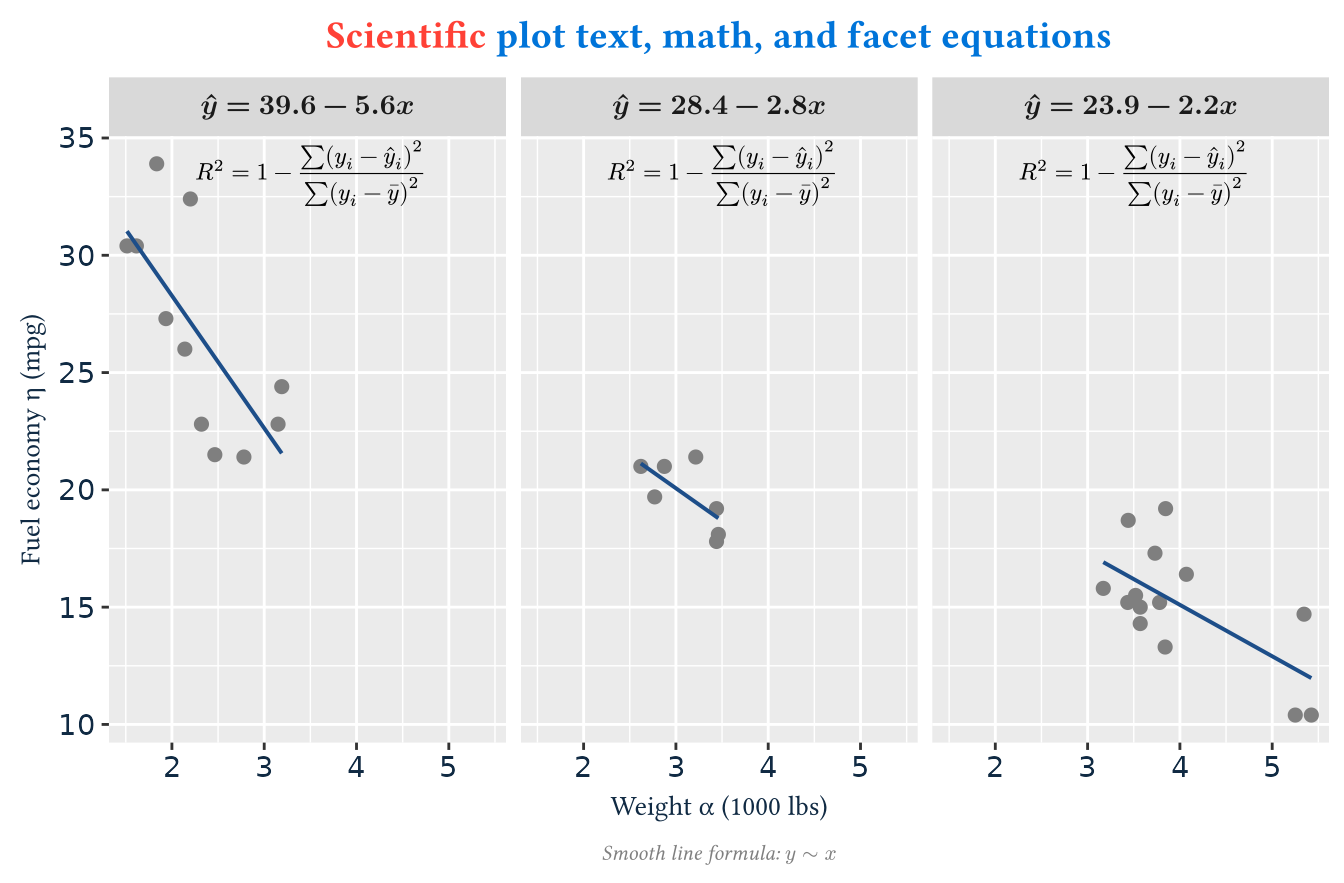
Consider these scenarios: you have a scientific plot, and now you want to:
- show your title with multiple styles, for example, the first word is red and the rest is blue
- add some special characters like Greek letters in your axis titles
- add high-quality complex math expressions as annotations in the plot
- use the corresponding regression equation as the title of each facet
How would you achieve this?
- Base
ggplot2text helpers are great for ordinary labels, but scientific and technical plots often need more than plain strings. - You can use
expression()in base R to add math. But its syntax is not natural and its functionality is limited. - The package
latex2exphelps you convert LaTeX math expressions to R expressions. But its functionality is also limited byexpression(). - The package
ggtextallows you to use Markdown and HTML tags to style your text. But it doesn’t support complex styles and math. -
tikzDevice/ggtikzallows you to use LaTeX. But it is too complex to use and must rely on external TeX toolchains, which are very heavy. - …
So is there a simple, lightweight, easy-to-use solution? Yes, that’s
why ggtypst is here!
Typst is a modern markup language and
typesetting engine written in Rust. You can write source text such as
*bold*, _italic_, #linebreak(),
or $ sum_(i=1)^n x_i $, and Typst turns it into polished
rendered output. It is fast, simple but powerful, solving these pain
points perfectly and elegantly.
ggtypst uses Typst’s Rust engine as the rendering
backend and offers a series of functions to fit ggplot2
workflow. With ggtypst, you don’t need to leave your
ggplot2 workflow, don’t need to rely on external LaTeX or
Typst, and can easily solve all the above use cases.
Click to see the code
eq_labels <- by(mtcars, mtcars$cyl, function(df) {
  fit <- lm(mpg ~ wt, data = df)
  coef <- unname(coef(fit))

  sprintf(
    "hat(y) = %.1f %s %.1f x",
    coef[1],
    if (coef[2] < 0) "-" else "+",
    abs(coef[2])
  )
})

ggplot(mtcars, aes(wt, mpg)) +
  geom_point(color = "grey50", size = 2) +
  geom_smooth(method = "lm", formula = y ~ x, se = FALSE, linewidth = 0.7, color = "#1D4E89") +
  facet_wrap(vars(cyl), nrow = 1, labeller = as_labeller(eq_labels)) +
  annotate_math_typst(
    r"(R^2 = 1 - sum(y_i - hat(y)_i)^2 / sum(y_i - macron(y))^2)",
    x = 3.5,
    y = 33.5,
    size = 10
  ) +
  labs(
    title = r"(#text(fill: red)[Scientific] #text(fill: blue)[plot text, math, and facet equations])",
    x = "Weight α (1000 lbs)",
    y = "Fuel economy η (mpg)",
    caption = "Smooth line formula: $y ~ x$"
  ) +
  theme(
    plot.title = element_typst(size = 16, face = "bold"),
    axis.title.x = element_typst(size = 12, colour = "#102A43"),
    axis.title.y = element_typst(size = 12, colour = "#102A43"),
    axis.text = element_typst(size = 11, colour = "#102A43"),
    strip.text = element_math_typst(size = 12, face = "bold"),
    plot.caption = element_typst(size = 9, color = "grey50", face = "italic")
  )
Installation
Install from pre-compile binary
Install ggtypst from R-universe first so you can use the
prebuilt package and avoid compiling Rust locally. On
Windows and macOS, you can run:
install.packages("ggtypst", repos = "https://yousa-mirage.r-universe.dev")On Ubuntu 24.04, you should run:
linux_binary_repo <- function(universe){
  sprintf(
    "https://%s.r-universe.dev/bin/linux/noble-%s/%s/",
    universe,
    R.version$arch,
    substr(getRversion(), 1, 3)
  )
}

install.packages("ggtypst", repos = linux_binary_repo("yousa-mirage"))
Install from source code
If you are on other Linux platforms, or you need the latest development version, you can install it from source:
install.packages("remotes")
remotes::install_github("Yousa-Mirage/ggtypst")
Because the GitHub installation builds the Typst backend in Rust, you
need rustc and cargo on your system to compile
it. Particularly on Windows, you must use the
x86_64-pc-windows-gnu toolchain.
Regardless of how you install ggtypst, you don’t need a
separate local Typst or LaTeX installation to use it.
First plot
A quick example is like this:
ggplot(mtcars, aes(wt, mpg)) +
  geom_point(color = "grey50") +
  annotate_typst(
    typst_code = "*Hello from Typst!* #linebreak() $sum_(i=1)^n x_i$",
    x = 4.8,
    y = 32,
    size = 14,
    color = "#1D4E89"
  ) +
  labs(
    title = "A first ggtypst plot",
    x = "Weight (1000 lbs)",
    y = "integral_0^1 x^2 dif x = 1/3"
  ) +
  theme_minimal(base_size = 12) +
  theme(
    plot.title = element_typst(size = 16, face = "bold.italic", colour = "#102A43"),
    axis.title.y = element_math_typst(size = 14, colour = "#1D4E89")
  )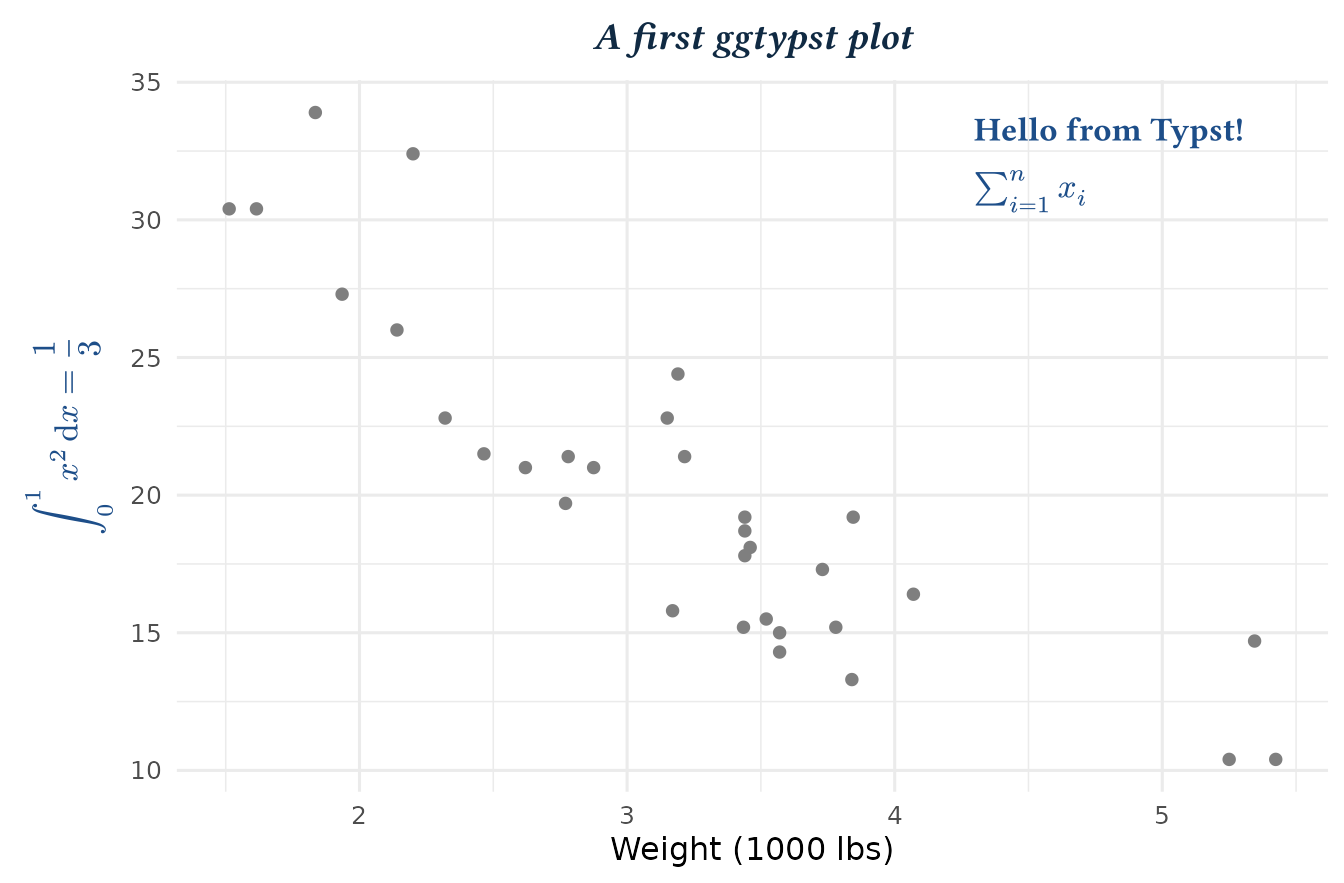
This shows the core usage of the package:
- First, we use
annotate_typst()to add a Typst label containing text and inline math.-
* ... *marks bold text. -
#linebreak()inserts a line break. -
$...$marks inline math. - We specified the plot location, text size and color by other arguments.
-
- Then, we want to render the title and axis titles with Typst.
- We write a common title, and then render it with Typst through
element_typst(). - We want to use a math expression as the y-axis title, so we write
the Typst math source code in
labs()and then useelement_math_typst()to render it.
- We write a common title, and then render it with Typst through
When to use annotate, geom, and element
Use the three function families according to where the rendered content comes from.
| Function family | Best for | Typical use |
|---|---|---|
annotate_*() |
one manually placed label | a callout, note, or equation |
geom_*() |
one label per row of data | point labels, grouped labels, math annotations |
element_*() |
theme text | titles, subtitles, axis text, strips, legends |
R raw strings
Typst and LaTeX source strings may contain lots of " and
\. In ordinary R strings, these characters need to be
escaped like "\\frac{a}{b}". Introduced in R 4.0.0, R raw
strings let you write these special characters directly without
escaping.
ℹ️ You should ALWAYS use the raw string
r"( ... )" in your Typst and LaTeX
source:
r"(*bold text*)"
r"($"a text in math" sum_(i=1)^n x_i$)"
r"(\frac{a}{b})"
Text, Typst math, and MiTeX math
ggtypst supports three related but different kinds of
content.
Typst markup content
Typst is a language for typesetting documents. It has two modes: the markup mode and the function mode. In markup mode, you write plain text with Typst markup syntax, similar to writing Markdown. For more details, please see the Typst documentation. It’s very easy to learn and use.
Use annotate_typst(), geom_typst(), or
element_typst() when the label is mostly text. For
example:
annotate_typst(
  typst_code = r"(*bold text*)",  # `*...*` means bold text
  x = 1,
  y = 1
) +
annotate_typst(
  typst_code = r"($a^2 + b^2 = c^2$)",  # `$...$` means inline math
  x = 2,
  y = 2
) +
annotate_typst(
  # In the line below, "Red text" is styled with `fill: red`, "default text" is styled with italic, and `+` is with default style.
  typst_code = r"(#text(fill: "red")[Red text] + _default text_)",
  x = 3,
  y = 3
)
Yeah, actually you can write any legal Typst content in
typst_code, including math, styled text, layouts, and
functions. You can even write a full Typst document in
typst_code, as long as the source string is legal Typst
content. They will be directly rendered by Typst.
Native Typst math
You can use *_math_typst() when you want to write math
directly. They are wrappers around *_typst() that use the
typst_math_code argument instead of
typst_code.
annotate_math_typst(
  typst_math_code = r"(sum_(i=1)^n x_i)",
  x = 1,
  y = 1
)
$ ... $ or $...$ will be automatically
added around your math code to make sure it is rendered as a math
expression. The difference is, $ ... $, which is default,
means display math, while $...$ means inline math. You can
use the inline argument to control which to use.
Of course, you can also use annotate_typst() and write
your math code in $ ... $ or $...$.
*_math_typst() are just more convenient wrappers.
One more important benefit of Typst is that you don’t need to have a
math font installed on your system to render math expressions. Typst has
embedded the New Computer Modern Math font in binary, so
you can render math anywhere and anytime.
MiTeX-backed LaTeX math
You can use annotate_math_mitex(),
geom_math_mitex(), or element_math_mitex() if
you are more familiar with LaTeX math syntax or when your input is
already in LaTeX. ggtypst converts LaTeX math into Typst
math by MiTeX in the
Rust backend. According to their documentation, this conversion is
stable and supports a wide range of LaTeX math syntax.
annotate_math_mitex(
  latex_math_code = r"(\frac{1}{2} + \sqrt{3})",
  x = 1,
  y = 1
)
annotate_*(): one-off plot annotations
annotate_*() is the easiest place to start because it
behaves like a normal manual annotation layer. Use this function family
when you just want to add one rich text note or math equation at a
specific position.
ggplot(mtcars, aes(wt, mpg)) +
  geom_point(color = "grey65") +
  annotate_typst(
    typst_code = r"(Some plain text)",
    x = 2,  # You must specify the x and y position manually
    y = 15
  ) +
  annotate_typst(
    typst_code = paste(
      r"(*Fuel economy* #linebreak())",  # text with bold markup and line break function
      r"(#text(fill: rgb("#1D4E89"))[Typst text] +)",  # text with fill color
      r"($integral_0^1 x^2 dif x = 1 / 3$)"  # inline math
    ),
    x = 4,
    y = 33,
    size = 12,
    color = "#102A43"
  ) +
  annotate_math_mitex(
    latex_math_code = r"(\eta = \frac{mpg}{wt})",  # LaTeX math code
    x = 5,
    y = 25,
    size = 14,
    color = "green",
    face = "bold"
  ) +
  theme_minimal(base_size = 12)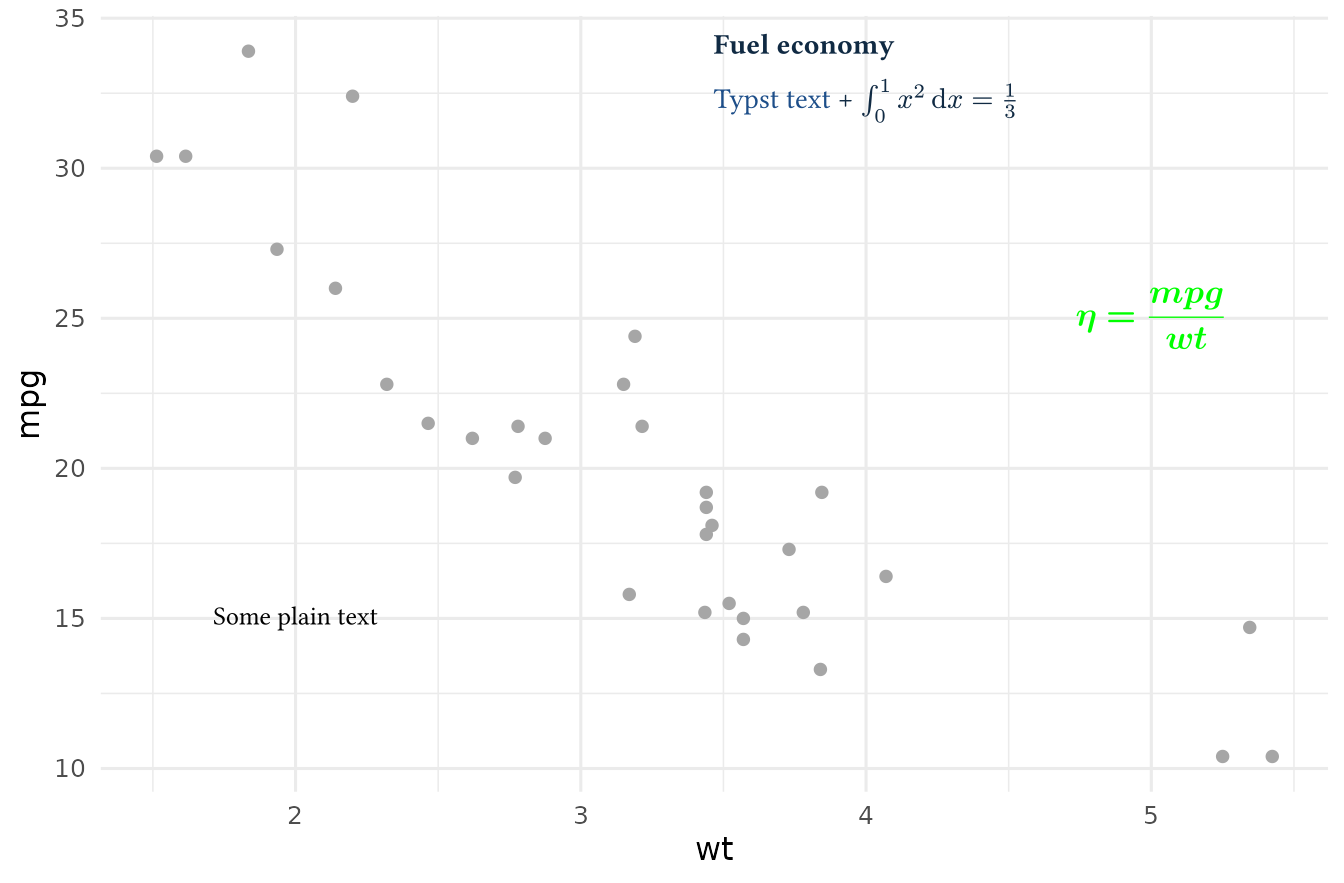
geom_*(): data-driven labels
geom_*() turns Typst source strings into a true data
layer. Each row gets its own rendered label and can map aesthetics like
colour, angle, and face. Use this
family when:
- you have many labels to render
- labels come from rows in a data frame
- each label may have different styling
- you want Typst output to behave like other
ggplot2geoms
labels <- data.frame(
  wt = c(2, 3, 5),
  mpg = c(33, 25, 15),
  label = c(
    r"(*Toyota Corolla* #linebreak() 33.9 mpg)",
    r"(*Fiat 128* #linebreak() nimble + efficient)",
    r"(*Maserati Bora* #linebreak() $v_8$ flagship)"
  ),
  colour = c("yellow", "#3A86A8", "#7A1E48"),
  face = c("italic", "bold.italic", "bold")
)

ggplot(mtcars, aes(wt, mpg)) +
  geom_point(color = "grey80", size = 2) +
  geom_typst(
    data = labels,
    aes(wt, mpg, label = label, colour = colour, face = face),
    size = 12,
    show.legend = FALSE
  ) +
  scale_colour_identity() +  # this is needed for colour mapping
  theme_minimal(base_size = 12)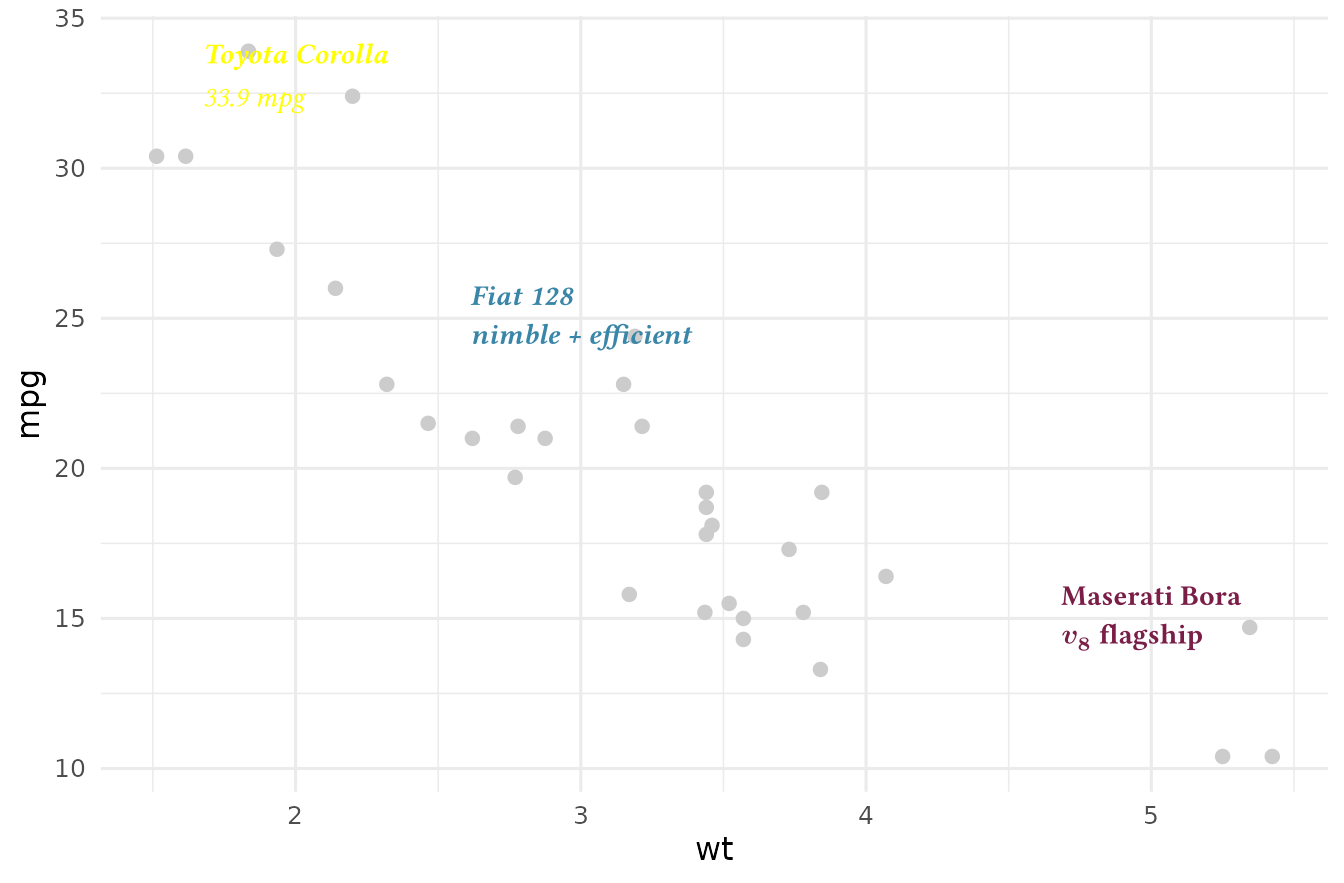
However, be careful not to use geom_typst() to render more than 50 label rows, as it will not only slow down rendering but also make your plot hard to read. For more details on performance, see the benchmark result.
element_*(): Typst in theme elements
element_*() is used to render the text of theme elements
with Typst. By element_*(), you can place rich text,
special characters, and math equations in your plot titles, subtitles,
axis titles, legend text, and facet strips.
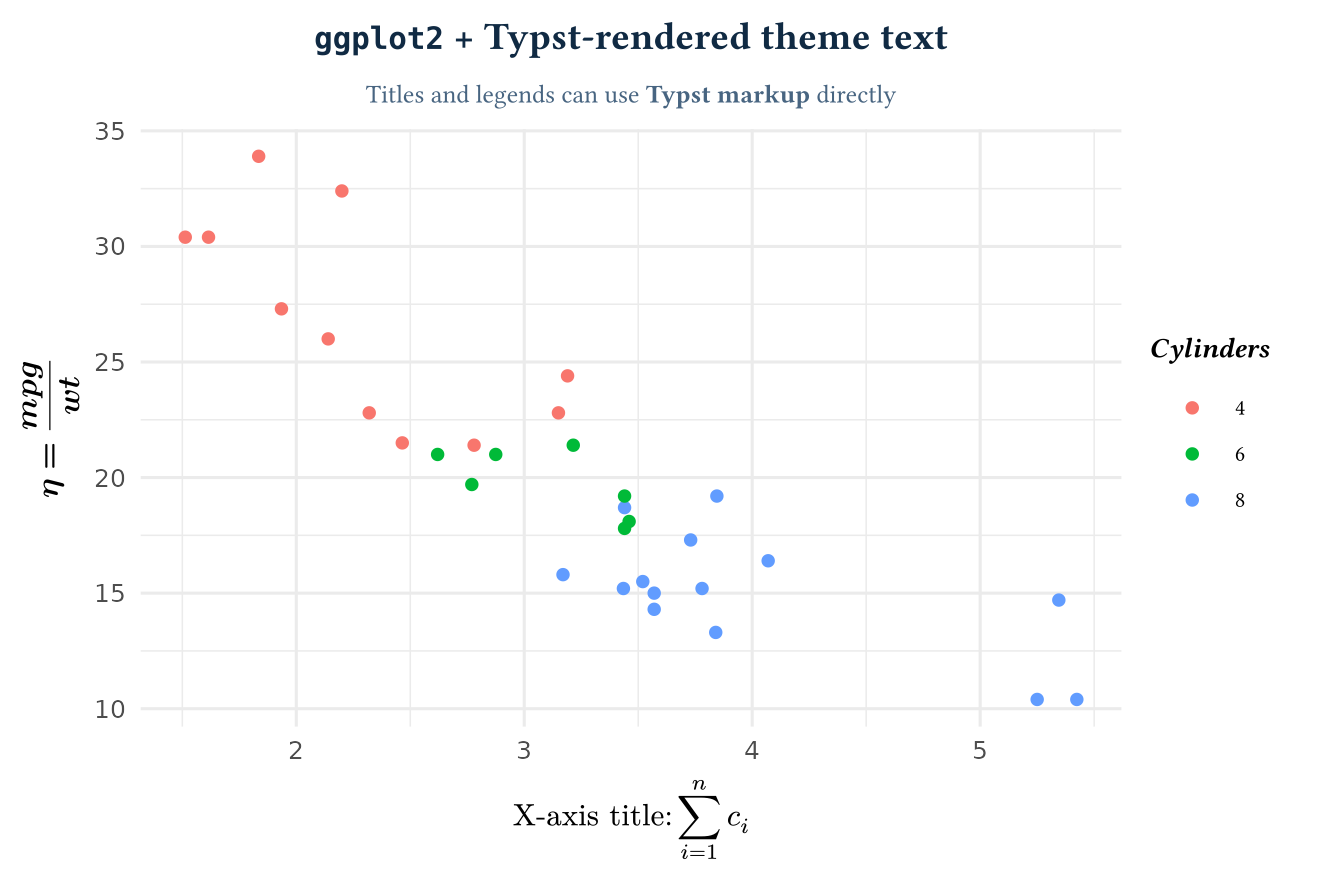
Imagine that your ggplot2 title is a math matrix,
while each facet label is the special regression equation!
ggplot(mtcars, aes(wt, mpg, colour = factor(cyl))) +
  geom_point() +
  labs(
    title = r"(`ggplot2` + Typst-rendered theme text)",
    subtitle = r"(Titles and legends can use *Typst markup* directly)",
    x = r"($"X-axis title:" sum_(i=1)^n c_i$)",
    y = r"(\eta = \frac{mpg}{wt})",  # LaTeX math is OK
    colour = r"(_*Cylinders*_)"
  ) +
  theme_minimal(base_size = 12) +
  theme(
    plot.title = element_typst(size = 16, face = "bold", colour = "#102A43"),
    plot.subtitle = element_typst(size = 11, colour = "#486581"),
    axis.title.x = element_math_typst(size = 13),
    axis.title.y = element_math_mitex(size = 13, face = "bold"),
    legend.title = element_typst(size = 12),
    legend.text = element_typst(size = 10)  # render legend labels with Typst
  )
Next steps
From here, you can explore:
- the function
reference for
annotate_*(),geom_*(), andelement_*() - the contributing guide if you want to understand the R/Rust architecture
- and practice
ggtypstin your RStudio/Positron/VS Code